Three to five hours. Every month. Just to figure out what your associates are owed.
If that sounds familiar, the spreadsheet, the PMS export, the lab invoices spread across your desk, the formula you are terrified to touch, then you already know why automating dental associate pay is not a nice-to-have. For most UK practices, it is embarrassingly overdue.
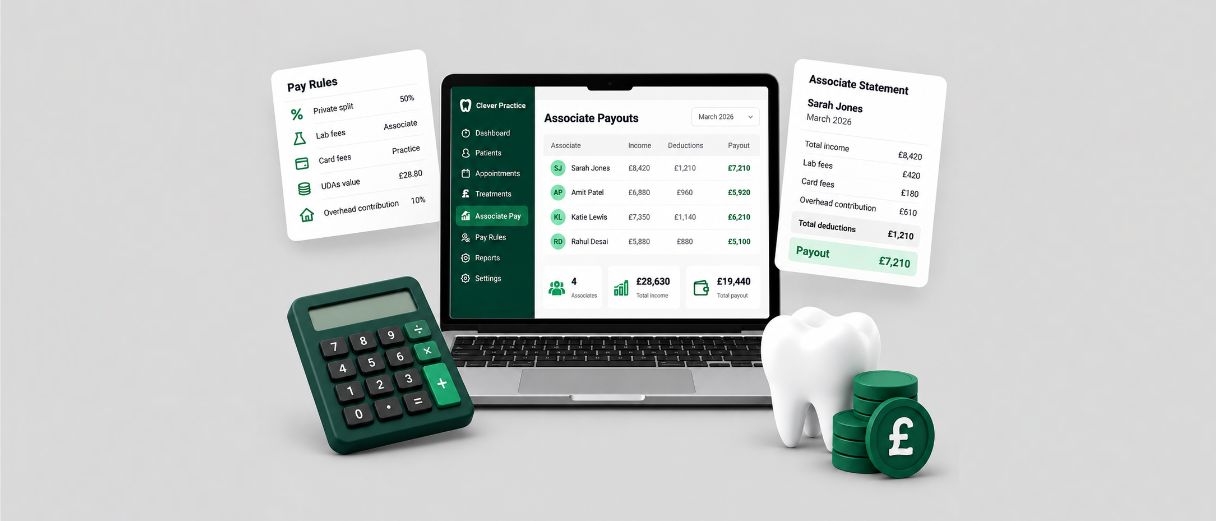
This guide explains why associate pay is difficult to manage manually, what the process is really costing a practice, what good automation should change, and how Clever Pay – the associate pay module within Clever Practice, built by Samera – handles the monthly workflow.
Key Takeaways
Manual associate pay takes 3-5 hours per practice per month – and up to 15 days for larger groups.
The most common errors are lab invoices going to the wrong associate and incorrect percentage calculations.
Clever Pay connects Dentally and Xero data in one workflow, holds the practice’s pay rules and produces a payout and statement for each associate.
Your finance team still reviews and approves the output.
Associates who can see how their pay was calculated raise fewer queries and are less likely to lose trust in the practice.
Why Dental Associate Pay has Always Been Calculated Manually
Ask anyone who has done it, dental associate pay is nothing like running a standard payroll. Associates are usually paid under their own agreed arrangements, while employees are managed through PAYE, payroll and workplace pensions. The payroll system knows it, applies it, done.
Associate pay is a different animal entirely, it moves every month, it is built on production or collections figures, and it gets adjusted by a set of deductions that vary not just between practices but sometimes between individual contracts within the same practice.
And the data you need to build that calculation? It is scattered across at least four different places. Production figures live in the practice management system. Payments and collections live in the accounting software. Lab invoices land from external suppliers and need to be manually matched to the right associate. Card processing fees sit in a separate terminal report. None of these talk to each other. You pull them all, line them up, and start reconciling, by hand, every time.
Then there is the deduction logic, which is where things get really practice-specific. A private practice might split lab fees 50/50 with the associate. An NHS practice has UDA targets baked into the calculation that directly affect what the associate takes home. A mixed practice is dealing with both simultaneously. Some contracts have an overhead contribution on top. Some do not. There is no standard formula that works everywhere, there is just yours, rebuilt from scratch each month.
“The reason there hasn’t been a proper software solution for associate pay until now is that the data for all of this sits in different systems. Lab bills sit in one system, clinical treatment data sits in another, and never the two are sitting together. Our job has been to bring all of that data into one integrated platform and then do the associate pay from there.”
Arun Mehra Samera CEO
The spreadsheet filled the gap because nothing better existed. It was free, it was flexible, and for a single-associate practice it more or less did the job. But it was never built for this. One associate – manageable. Five – you are one bad formula away from a problem. Multiple sites – it stops being a spreadsheet and starts being a liability.
Trupti Darekar, one of the dental accountants at Samera, works through these calculations with dental practices every month. She sees the same mistakes repeatedly.
“The major errors we see are wrong lab bills going to the wrong dentist, and wrong calculations of the percentage. Those two things come up again and again with clients.”
Trupti Darekar Samera Client Accountant
Both come from the same place, a process held together manually that was never designed to be manual. A lab invoice tagged to the wrong associate quietly reduces one person’s pay and inflates another’s. A percentage that has shifted in the spreadsheet, by a decimal, by an accidental keystroke runs uncorrected for months until someone notices the numbers do not feel right.
What Manual Associate Pay is Costing Your Dental Practice
Most practice owners think of associate pay as a time problem. It is that but the hours are honestly the least of it. The costs that do not show up on a profit and loss are the ones that hurt more- the associate who quietly stops trusting you, the dispute that escalates before anyone realises how it started, the practice manager who spends every month end doing financial admin instead of actually managing the practice.
Start with the time. Samera’s benchmark for a typical single-site UK dental practice is four to five hours per month on manual associate pay calculations. For groups, that number does not scale linearly, it explodes.
“I was speaking to a dental group last week with about 40 practices, and they told me it takes them between 10 and 15 days just to get associate pay done and they consider themselves quite organised. Information is coming from different locations, lab bills from another, everything sitting in different pots. It’s just not organised.”
Arun Mehra Samera CEO
Ten to fifteen days. Per month. For a task that should take minutes. And that is at a well-run group. The time your practice manager spends rebuilding that spreadsheet is time they are not spending on patient relationships, team development, or anything else that actually moves the practice forward.
The error cost is harder to put a number on and considerably more damaging. An underpaid associate loses trust immediately. An overpaid one has to be asked to hand money back, which is uncomfortable at best. Let it run for a few months without anyone noticing and you are no longer having an awkward conversation, you are potentially having a legal one.
“We have seen cases with clients where associates haven’t been paid correctly for months. By the time lawyers get involved, it is messy, expensive, and just draining mentally for everyone. And often it started with a spreadsheet error that nobody caught.”
Arun Mehra Samera CEO
Good dental associates are not easy to find and not easy to keep. They talk to each other, they compare notes, and a practice with a reputation for pay errors even an informal one, passed around at study clubs will feel that in recruitment and retention long before it shows up anywhere official.
“If pay is continually calculated wrong, people stop trusting the practice owner. That has a knock-on effect on motivation, and then people decide they don’t want to stay. If you have a system that’s transparent, where the associate can see exactly how things have been calculated that only helps the situation.”
Arun Mehra Samera CEO
Pay is personal. Getting it wrong once is a mistake. Getting it wrong repeatedly is a statement about how your practice operates and most associates will reach that conclusion long before they say anything out loud.
Need help managing associate pay each month?
Our Associate Pay Automation service helps dental practices manage monthly associate pay more consistently, with less spreadsheet work and fewer manual checks.
Clever Pay is the associate pay module of Clever Practice, powered by Samera. It automates monthly associate pay using data from Dentally and Xero, and it supports NHS UDA-based pay alongside private fee splits. Practices use Pay Rules to set how pay is calculated, Associate Payouts to review the results, and a branded statement to issue each associate’s pay.
See how Clever Pay works
Clever Pay brings associate pay rules, deductions, NHS activity and monthly payouts into one workflow.
How Clever Pay automates the monthly associate pay process
The monthly process runs in seven stages. The first two are mostly setup, and the rest repeat each month. NHS pay and deductions are the most detailed stages, so each has its own guide.
1. Connect your practice data
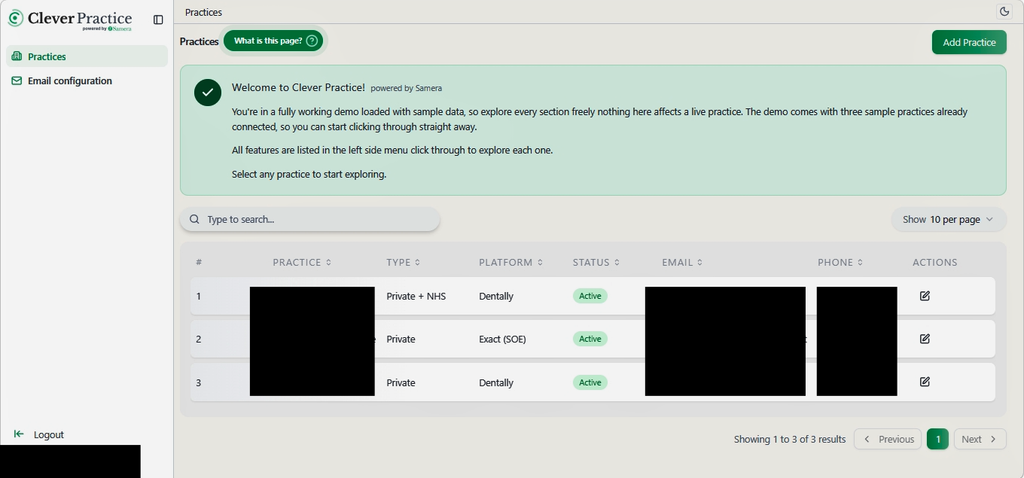
Clever Pay starts with the data the practice already produces. It connects to the practice management system and to Xero, so production, payment and bill data reach the pay calculation without manual exports. The Practices list shows each connected practice, its platform and whether it is Private or Private + NHS. That Type setting is what switches on NHS features later in the workflow.
This is a setup stage, not a monthly task. Clever Pay relies on the Dentally and Xero connections being in place and on deduction accounts being linked to the correct chart of accounts.
The Practices list, showing each practice’s Type and Platform.
2. Set the pay rules for each practitioner
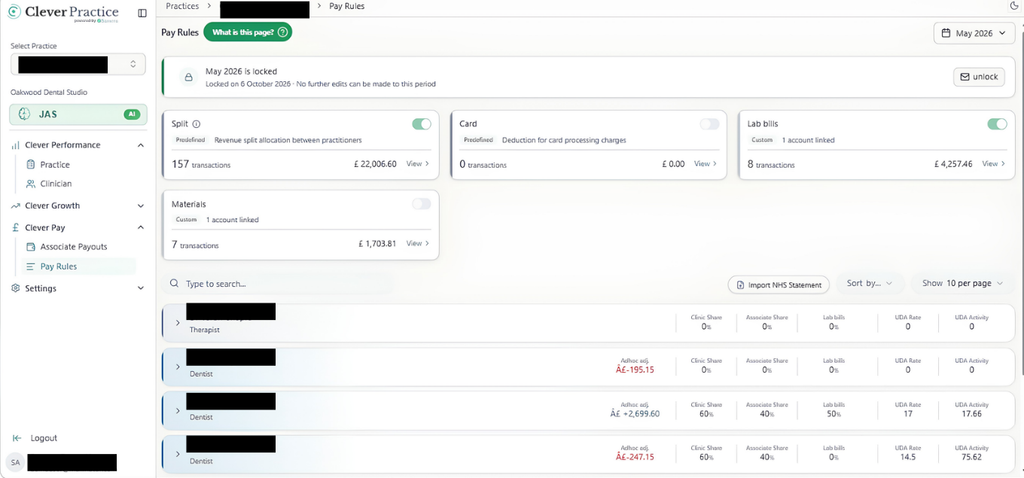
Pay Rules is where the practice records the arrangements it has already agreed. Three practice-wide cards cover Split, Card and Materials, each with a toggle and a total for the period. Individual practitioner rows add their own Clinic Share, Associate Share and Materials percentages, plus an Adhoc Adj. field for one-off adjustments. Practices can also add custom deductions linked to their Xero accounts.
This is where practitioner-by-practitioner variation lives. Each associate can have different rules, and each rule sits in one visible place instead of inside a formula. Clever Pay applies what the practice enters. It does not decide what those rules should be.
Pay Rules, showing the Split, Card and Materials cards with practitioner rows below.
3. Bring NHS data into Clever Pay
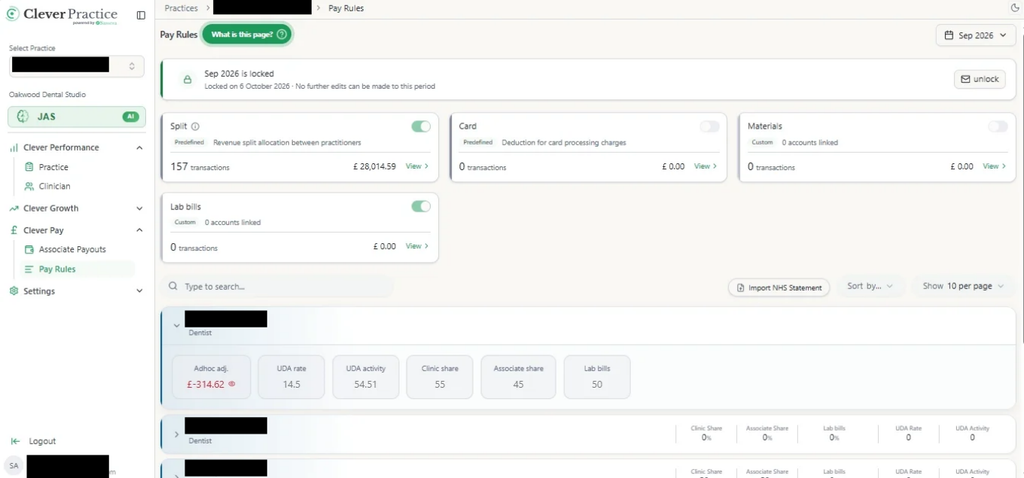
NHS income does not arrive through the same channel as private fee data. For practices with NHS contracts, Clever Pay brings the NHS statement into the same monthly workflow. The practice imports the statement for the period from the Pay Rules screen and sets each NHS or mixed practitioner’s UDA Rate and UDA Activity.
That puts NHS and private income into one calculation for each practitioner, instead of two separate processes.
An expanded practitioner row, showing UDA Rate, UDA Activity and the private share fields.
4. Review deductions and the transactions behind them
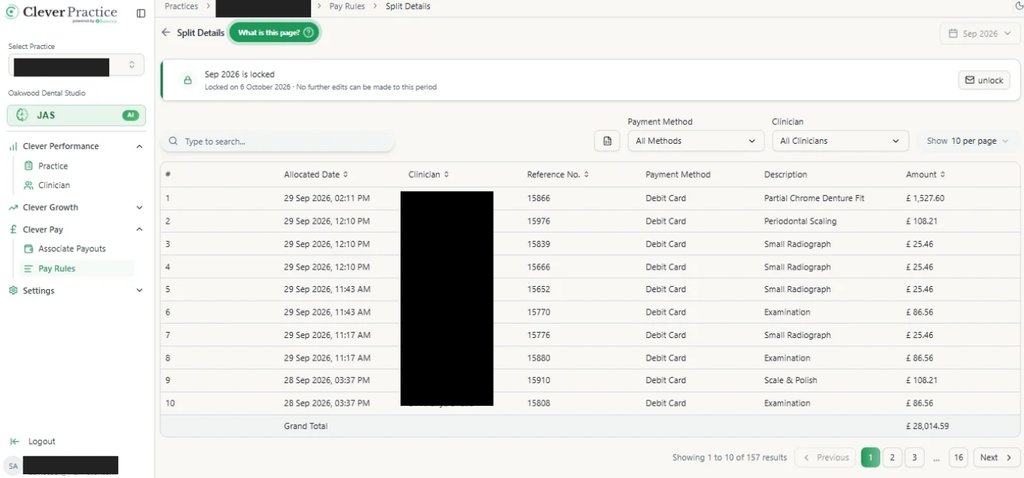
Every deduction card on Pay Rules links to a transaction ledger. The ledger lists the payments or bills that make up the total, with filters such as clinician and payment method, and a Grand Total that should match the figure on the main screen.
The practice can check a figure before it reaches an associate and answer a query afterwards with the supporting transactions in front of them, instead of rebuilding the answer from exports.
Split Details, the transaction ledger behind the Split card.
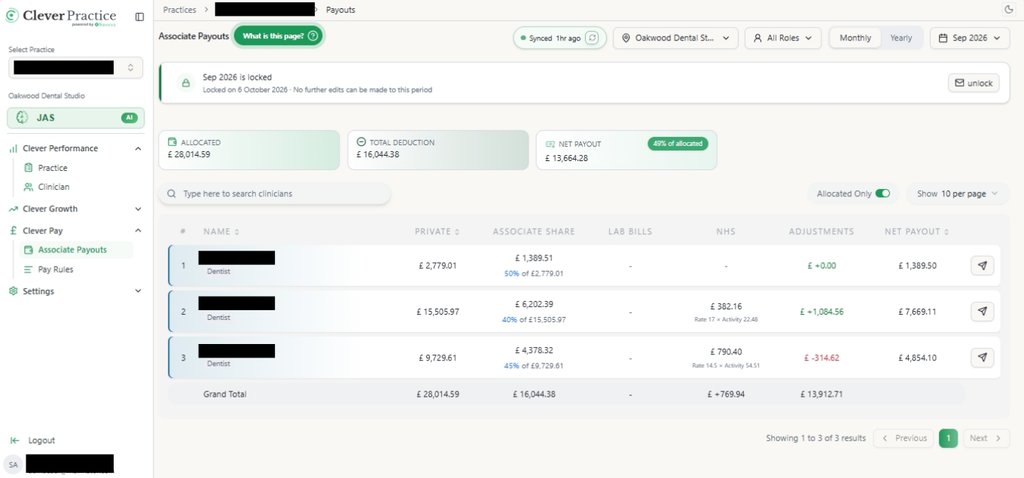
Associate Payouts is the monthly summary. It shows one row for each practitioner, reconciled against the pay rules set up in the earlier stages. Columns break each person’s pay down by source and deduction: Private, Associate Share, NHS, Card and Materials. Net Payout is the final amount due to that practitioner after all deductions.
Three cards at the top, Allocated, Total Deduction and Net Payout, summarise the whole practice for the period. A clinic selector, a Role filter and a Monthly or Yearly toggle change what the table shows, and a month and year picker moves between accounting periods.
This is the review point. Nothing goes to an associate until the practice has checked the numbers. A practice manager can compare private and NHS income side by side, spot a figure that looks wrong and trace it back through the ledger before any statement is sent. Because every row follows the same rules, reviewing ten associates means the same checks as reviewing one.
Associate Payouts, showing Private, NHS, Card, Materials and Net Payout per practitioner.
6. Review and send the associate pay statement
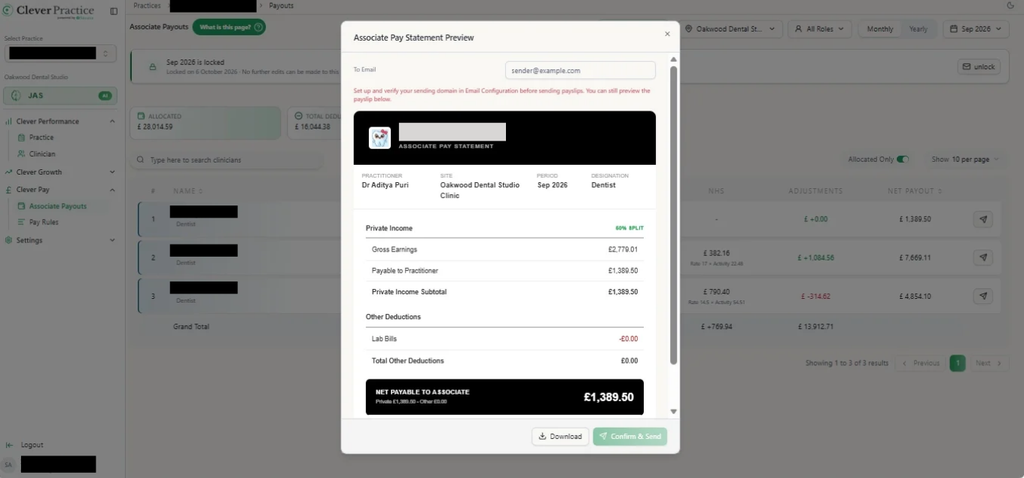
From each practitioner’s row, the send icon opens a branded, ready-to-send pay statement. The practice does not need to rebuild the figures in a spreadsheet or Word document.
The statement breaks pay down in a form the associate can follow. Private Income shows Gross Earnings, the practitioner’s split percentage and any lab bill deductions, down to a Private Income Subtotal. Where it applies, NHS Income shows the UDA Payment, Orthodontics Income and statutory deductions. Other Deductions list Card and Materials charges, and a final Net Payable to Associate figure combines everything.
The practice checks the To Email field, then either downloads a copy for its own records or confirms and sends the statement directly. The associate receives one clear document in place of a set of separate calculations. The logo and business name come from Payslip Branding in Settings, and the sender address comes from Email Configuration, so the statement looks like it belongs to the practice.
The Associate Pay Statement preview, with Card and Materials listed under Other Deductions.
7. Complete and lock the pay period
Once the practice has confirmed the payouts, the final step is to lock the period. Locking prevents accidental changes after the figures are finalised. It works best as the closing step of the monthly routine, not an optional extra.
Then the cycle repeats. The routine runs in order: import any NHS statement, review Pay Rules for changes, copy deduction rules into the new period, check Associate Payouts, send statements and lock the period. Copy Deduction Rules carries the existing setup forward, so the practice does not rebuild it each month.
What Clever Pay does not decide for you
Clever Pay applies the rules a practice has configured. It does not recommend a split, decide which deductions should apply or in what order, or interpret an associate’s contract or an NHS contract. Those commercial and contractual decisions sit with the practice, its associates and its advisers.
Managing NHS and UDA Associate Pay with Clever Pay
NHS and mixed practices add extra layers to associate pay. NHS statement data arrives separately from private income, each practitioner can have their own UDA arrangement, and statutory deductions must appear correctly on the final payout. Repeating that for every NHS or mixed associate each month creates repetitive work. Clever Pay brings these elements into one workflow.
Problem
Clever Pay solution
Outcome
NHS statement data needs to be incorporated separately from private income.
Import NHS statements into Clever Pay.
NHS and private income can be reviewed together.
Different associates have different UDA rates and pay arrangements.
Configure UDA rates and activity for individual practitioners.
Different arrangements can be managed within one system.
NHS income, private income and deductions need reconciling.
Review combined payouts and generate a consolidated statement.
Clearer month-end checks and one statement per associate.
Need more detail on NHS and UDA pay?
See how NHS statements, UDA activity and associate pay can be handled within the monthly pay process.
Managing and Auditing Dental Associate Pay Deductions with Clever Pay
Deductions rarely look the same for every associate. A practice with several associates can have different arrangements, charges that come from the accounts and queries that arrive after statements go out. Each one creates administrative work. Clever Pay holds the agreed rules in one place and keeps the transactions behind each deduction visible, so figures can be applied consistently and explained when needed.
Problem
Clever Pay solution
Outcome
Different associates have different deduction arrangements.
Configure practice-wide and practitioner-specific rules.
Agreed rules are applied consistently.
Deduction figures rely on manually compiled financial data.
Link deductions to the relevant Xero accounts.
Relevant transactions feed into the deduction workflow.
Associates question deductions on their statements.
Trace figures through the underlying transaction ledgers.
Managers can explain deductions using supporting evidence.
Rules need to be carried forward every month.
Copy existing deduction rules into the next period.
Less repetitive monthly setup work.
Need to trace a deduction back to the source?
See how deduction rules can be applied, linked to Xero transactions and checked when an associate queries a figure.
Manual vs Automated Dental Associate Pay: A Side-by-Side Comparison
The table below maps the manual process against the automated one, stage by stage. If you are still running dental associate pay on a spreadsheet, read each row and be honest with yourself about which column you are living in and what it is costing you to stay there.
Area
Manual (spreadsheet)
Automated (Clever Pay)
Data gathering
Exports from the practice management system and accounts are copied into a workbook each month.
Dentally and Xero data feed the Pay Rules and Associate Payouts screens.
Rule management
Percentages and formulas sit in cells that are rolled forward by hand.
Practice-wide and practitioner-level rules are held in Pay Rules and carried forward with Copy Deduction Rules.
Deductions
Card, materials and lab charges are matched to each associate manually.
Split, Card, Materials and custom deductions each link to a transaction ledger.
NHS
NHS statement figures and UDA calculations are kept in separate sheets.
NHS statement import and practitioner UDA Rate and Activity sit alongside private rules.
Statements
Pay summaries are built separately for each associate.
A branded statement is generated from the payout and can be downloaded or sent.
Review
Checking depends on someone spotting an error in the workbook.
Associate Payouts shows Private, NHS, Card, Materials and Net Payout per practitioner before anything goes out.
Period control
A finished month’s file can be edited later by accident.
Locking a period prevents accidental changes once payouts are finalised.
Dispute resolution
Tracing a queried figure means going back through spreadsheet versions and source data.
Figures can be traced through the pay rules and underlying transaction data, making queries easier to investigate.
Look at the dispute resolution row. That one tells you everything. When something goes wrong in a manual process, you are not just fixing a number you are going back through multiple versions of a spreadsheet, trying to reconstruct a calculation that was built at month end when everyone was under pressure and nobody was being as careful as they should have been.
It can take time. With Clever Pay, the practice can trace a queried deduction back through the pay rules and the transactions behind it, rather than rebuilding the answer from old exports and spreadsheet versions.
That does not remove the need to investigate a query, but it gives the practice a clearer audit trail and a much better starting point.
“What makes the AI software superior is speed. They don’t actually have to do anything – it just does it. Assuming everything has been set up correctly and the bookkeeping is in order, the time saving is instant. Speed and accuracy. Those are the two things people notice first.”
Trupti Darekar Samera Client Accountant
Clever Pay automates the calculation and data handling, but the practice still reviews the final payout before any associate statement is sent.
Choosing Dental Associate Pay Software: What to Look For
Dental associate pay software is a young category, which means the market is still a bit of a mixed bag. Some tools that call themselves automation still need you to export a file manually and upload it at which point all they are doing is applying a formula to data you have already pulled yourself. That is a neater spreadsheet with a nicer interface. It is not automation. Here is what to actually look for.
Does the provider understand dental practice?
This is the question that matters most, and it should come before any conversation about features or pricing. General payroll software – Sage, Xero Payroll is built for employees on fixed salaries. It has no concept of production-based pay, no understanding of lab fee deduction structures, no awareness of NHS UDA targets or how they affect what an associate actually takes home.
“Dental-specific” should mean built from the ground up around how UK associates are paid not a generic tool with a dental logo on the login page.
“The most important question to ask any provider is: do the people who developed this actually know how dental practices work? Do they understand the problems practices face day by day, week by week? The key is to solve real problems not just provide fancy dashboards.”
Arun Mehra Samera CEO
Is the integration genuine?
If getting your data into the platform requires you to export a CSV from your PMS and upload it manually, the fundamental problem has not been solved it has just been moved one step along. What you need is a direct, live connection between the platform and both your practice management system and your accounting software. That is the difference between actual dental associate pay automation and a slightly more organised version of what you are already doing.
Can it handle your deduction logic specifically?
This is where a lot of platforms fall short. NHS UDA calculations, private fee splits, lab fee arrangements, card processing deductions none of these are standard. They vary between practices, and often between individual contracts within the same practice. Do not let any provider show you a generic demo and assume it covers your setup. Ask them to walk through your actual rules. If the answer involves manual workarounds, keep looking.
Will it still work when you grow?
A platform that handles three associates at one site reasonably well is not necessarily going to cope with fifteen associates across four sites without your finance team having to rebuild the configuration from scratch each time. If growing your dental practice is the plan, make sure the system was designed for it. The efficiency gains from automating dental associate pay compound as a group scales, but only if the infrastructure was built to scale with you.
What does the associate actually see?
This one gets overlooked more than it should. An associate who receives a clear, itemised pay summary every deduction explained, every figure traceable is an associate who raises fewer queries, trusts the process, and is less likely to quietly start wondering whether they are being paid correctly. A platform that produces a pay slip your associates can actually understand is not just good for relationships. It saves your practice manager time every single month.
How does it handle your data?
Associate pay means sensitive financial data. In practices connected to Dentally, it means data that sits close to patient records. Any third-party platform handling this needs to be GDPR-compliant and storing data on UK-based servers, not just claiming to be compliant in the small print. Ask directly, and if the answer is vague, that tells you something.
“When choosing any associate pay platform, make sure the provider has all the necessary credentials, that they’re GDPR compliant and that the data sits on servers based in the UK. That’s an important aspect from a cybersecurity and data protection point of view.”
Arun Mehra Samera CEO
Who is Clever Pay for?
Clever Pay suits practices and groups that spend significant time each month preparing associate pay, or that manage varied practitioner arrangements, a mix of private and NHS work or regular associate queries.
If associate pay is simple, stable and rarely questioned, a spreadsheet may be enough.
As the number of associates, sites and different pay arrangements grows, the case for a more structured and auditable process becomes much stronger.
Would Clever Pay suit your practice?
Clever Pay is most useful where associate pay takes significant time each month, different associates have different arrangements, or NHS and private pay need to be managed together.
Four hours a month. Every month. On a calculation that should take minutes.
If that is where you are, whether you are a single-site practice nursing a spreadsheet or a growing group where associate pay is eating days of your finance team’s time, it is not going to fix itself. The data is not going to start talking to each other on its own.
The formula is not going to stop breaking. The associates are not going to stop calling.
If preparing associate pay still means exports, formulas and chasing queries, see how Clever Pay brings the monthly workflow into one place.
Clever Pay is built specifically for dental practices and groups. It connects practice and accounting data, applies the pay rules your practice has configured, and gives your team a clear payout and itemised associate statement to review each month.
Run a smoother, more profitable dental practice with Clever Practice
Practice management insights to help you reduce admin, improve performance and make better decisions.
Automate associate pay
Save time and remove errors.
Fill empty chairs
Attract more patients and increase chair utilisation.
Track financial performance
Get clear, real-time insights into your practice finances.
Dental associate pay automation uses software to bring the data, agreed pay rules, deductions, review process and associate statements into one repeatable monthly workflow.
Instead of rebuilding the calculation from spreadsheets, exports and separate source data each month, the practice sets up the relevant rules and reviews the calculated payout before anything is sent to the associate.
Can different associates have different pay and deduction rules?
Yes. Associates rarely have identical arrangements.
Clever Pay allows practices to hold practitioner-level settings for areas such as percentage splits, materials, card charges and other deductions. Custom deductions can also be linked to relevant Xero accounts.
The software applies the rules the practice has configured for each associate rather than relying on one standard formula across the whole practice.
Does Clever Pay support NHS and mixed NHS/private practices?
Yes.
For NHS and mixed practices, Clever Pay can bring NHS statement data into the same monthly workflow as private associate pay. Practices can set the relevant UDA Rate and UDA Activity for individual practitioners and review NHS and private income together within the associate payout.
Does Clever Pay decide what percentage split or deductions an associate should have?
No.
Clever Pay applies the rules the practice has already agreed. It does not recommend what percentage split should be used, decide which deductions should apply, determine the order in which contractual deductions should be made, or interpret an associate or NHS contract.
Those decisions remain with the practice, the associate and their advisers.
Can I review the associate pay calculation before anything is sent?
Yes.
Associate Payouts is the review stage of the Clever Pay workflow. It shows the different elements of each practitioner’s payout, including private income, NHS income where applicable, deductions and the final Net Payout.
The practice reviews the figures before issuing the associate statement.
How are associate pay deductions handled?
Clever Pay allows practices to configure agreed deduction rules and review the transactions behind the totals.
Deduction categories can link to the underlying payments or bills, helping the practice trace where a figure has come from when reviewing the payout or responding to an associate query.
What does the associate receive?
Once the payout has been reviewed, Clever Pay can generate an itemised associate pay statement.
The statement can show the relevant income, percentage split, NHS income where applicable, deductions and the final amount payable to the associate.
This gives both the practice and the associate a clearer record of how the final figure has been calculated.
Can completed associate pay periods be changed accidentally?
Clever Pay allows a completed pay period to be locked once the figures have been reviewed and finalised.
This helps prevent accidental changes to a completed period after associate statements have been issued.
Is associate pay software the same as payroll software?
No.
Standard payroll software is designed primarily for employees and processes such as salaries, PAYE and National Insurance.
Dental associate pay is different because the amount can vary each month based on the associate’s agreed percentage split, income, deductions and, where relevant, NHS activity.
Associate pay software is designed specifically around that type of calculation and monthly review process.
When should a dental practice consider automating associate pay?
Automation becomes particularly useful when the monthly process is taking significant time, different associates have different arrangements, the practice has a mix of NHS and private income, or the team regularly has to investigate queries about deductions or payouts.
It can also become more valuable as a practice adds associates or locations and the spreadsheet process becomes harder to manage consistently.
A very simple practice with one straightforward associate arrangement may still find a spreadsheet sufficient. The important question is whether the current process remains easy to review, trace and manage as the practice grows.
Neha Jain is a skilled content writer with a rich background in business and financial knowledge. With a bachelor’s degree in English Literature and Psychology, Neha has honed her writing skills, furthering her expertise with the Content Writing Master Course (CWMC) at IIM SKILLS and a Content Marketing Certification from HubSpot Academy.
Working alongside our business development experts, Neha specialises in helping accountants, dentists and other healthcare professionals start, scale and sell their businesses.
Arun Mehra is a specialist adviser to dental practice owners, with extensive experience across practice acquisitions, finance, growth and business strategy. As CEO of Samera, he works closely with dentists at every stage of ownership.
Trupti is one of our accountants who works directly with dentists, dental practice owners and dental groups of all sizes across the UK. She specialises in helping dentists with managing bookkeeping and preparing monthly management accounts.
Need help with your dental accounts?
Samera works with dental associates, practice owners and dental groups to manage accounts, tax, bookkeeping and financial reporting. If you want clearer numbers, less admin and a system that works throughout the year, book a free consultation with our dental accounting team.
Contact us to talk directly or find out more about our accountancy services: